
Start with the symptom, then find the table family
Most fault-code pages begin with the code. In practice, a machine often begins with a symptom: it cranks but will not start, it stalls after it warms up, the idle hangs, the front wheels stop pulling, the steering gets heavy, or the display shows a temperature warning. The code may not be visible yet, and the display may show only a light or a message.
This guide maps common symptoms to the code families that appear in the Polaris tables published on this site. The map is built from the short labels in those tables. It is not a causal diagnosis, and it does not tell you which part has failed. It is a way to narrow the table rows you should read and to decide what details are worth recording before a code appears or before a service visit.
Every symptom can have more than one cause. A no-start can be a crank signal, a fuel pump driver, a supply-voltage event, a security condition, or a mechanical issue that never sets a code. The table can only describe the codes it contains. The symptom map is a starting point for reading, not a conclusion.
How the map was built
The map uses the code labels from the cited OEM chapters: crank position, fuel pump driver, system voltage, idle air control, throttle position, throttle safety, AWD control, Active Descent, electric power steering, engine temperature, fan relay driver, gear position, and vehicle speed. Those labels are grouped by the system they name, then matched to the symptoms that are commonly described alongside them.
The grouping is editorial. The OEM chapter does not publish a symptom index in the owner’s manual, and it does not say that a particular symptom is always caused by a particular code. The map is a reading aid that uses the labels as a vocabulary. The model-year page remains the source for the exact code and label for your machine.
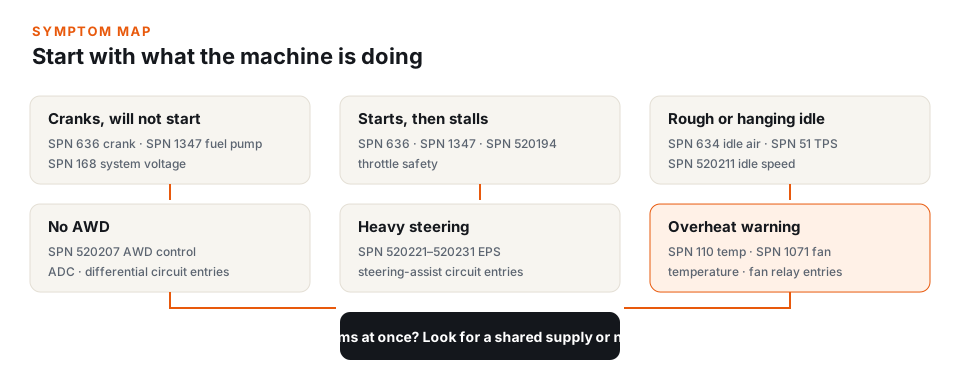
Cranks but will not start
A machine that cranks normally but does not start is one of the most common reasons to open a code table. The table families most often associated with this symptom are crank position (SPN 636), fuel pump driver (SPN 1347), and system voltage (SPN 168). Some models also publish an ECU memory or calibration entry that can appear after a low-voltage event.
The crank position label describes the signal the controller uses to determine engine position and speed. A missing or implausible signal can prevent the controller from scheduling fuel and spark. The label does not tell you whether the sensor, the trigger wheel, the harness, or the connector is responsible. It tells you which circuit the controller flagged.
The fuel pump driver label describes the controller output that commands the pump. A driver entry can appear when the controller detects an open, a short, or a current condition on that output. The label does not prove that the pump has failed. The same entry can appear with a harness run, a connector, or a relay in the same circuit.
The system voltage label is the shared-supply entry. When it appears alongside a no-start, the table is showing that the controller recorded a supply condition at the same time. That does not mean the supply caused the no-start, but it is part of the observation. A voltage entry alongside several unrelated codes is a different pattern from a single crank or fuel-pump entry.
Starts, then stalls or cuts out
A machine that starts and then stalls can produce an overlapping set of code families. Crank position, fuel pump driver, and throttle safety are the most common in the published tables. Some models add a chassis relay or a main relay entry that can interrupt power to several systems.
The overlap is the point. A stall is an event, and several controllers can record the event from different sides. The engine controller may record a crank signal; the chassis controller may record a relay or supply entry; the throttle system may record a plausibility entry. The codes together describe the event; the table labels describe each circuit.
An intermittent stall is especially dependent on the conditions you record. A stall on a cold start, a stall after a hot soak, a stall under load, and a stall when the machine is wet are different observations. The code may be the same, but the conditions narrow the part of the table that is relevant. The index does not store those conditions; you do.
Rough or hanging idle
Rough or hanging idle is usually associated with the idle air control circuit (SPN 634), the throttle position sensor (SPN 51), and the idle speed entry (SPN 520211) on tables that publish it. Some models also use a throttle safety entry when the idle behavior is part of a plausibility check.
The idle air control label describes the controller’s ability to command the idle air passage. The throttle position label describes the signal that tells the controller where the throttle is. An idle speed label describes the target or the measured idle condition. These are different kinds of entries even when they appear together.
A hanging idle can also be mechanical, such as a throttle cable or linkage that does not return. The table may not contain a code for that condition. This is one of the limits of a code index: a symptom can be real without a matching row. The absence of a code does not mean the symptom is not happening; it means the controller did not record a fault in the circuits it monitors.
No AWD, or AWD that drops out
The AWD control family is usually published under SPN 520207. Some tables also include Active Descent control entries, differential circuit entries, and a chassis relay entry that can affect the AWD system. The labels describe the control circuit, not the mechanical condition of the front differential.
An AWD symptom can appear with a single control entry or with a cluster that includes system voltage. A utility machine that operates in mud, water, and dust can have connector and harness conditions that are not visible from the driver’s seat. The table can tell you which circuit the controller flagged; it cannot tell you whether the connector is wet, the harness is chafed, or the differential has an internal problem.
The model notes on the shared 83-code page identify which machines in the group use AWD and Active Descent. The table is shared across several models, so a row can describe a circuit that is not fitted to every machine. The code on the display determines which row applies.
Heavy steering or a steering warning
Electric power steering and electric power-assisted steering entries appear in the SPN 520221 through 520231 range on several Polaris tables. The labels describe the steering-assist circuit, the motor, the sensor, or a supply condition. Some models add a steering-angle or position entry.
A heavy-steering symptom can appear with a steering-assist code, a system-voltage code, or both. The steering system draws significant current, and a supply event can affect it alongside other systems. That does not mean the supply is the cause of every steering entry, but it is one of the patterns the table can show.
The Pro R and Turbo R tables use a condition format rather than a component/failure format for many rows. A condition such as a steering-angle error names a condition the controller detected. It does not prove that the steering rack, the sensor, or the motor has failed. The condition text is the label; the source chapter is the definition.
Overheat warning or reduced power
Engine temperature entries usually appear under SPN 110, with the FMI distinguishing a circuit fault from a condition that is above the normal operating range. The fan relay driver (SPN 1071) may also appear, along with a system-voltage entry. The table may use FMI 16 or FMI 0 for the high-temperature condition, depending on the controller and the model year.
The temperature label is a description of what the controller observed. The fan relay label describes the output that commands the fan. The two can appear together, but they are separate entries. A temperature condition does not prove that the fan has failed, and a fan relay entry does not prove that the engine is overheating.
The index does not provide a procedure for cooling-system service, and it does not determine whether a machine should be operated. The label is a diagnostic definition. The OEM manual and the service information for the machine are the sources for the procedure.
Wrong or blank gear display
Gear position entries usually appear under SPN 523, with a related vehicle-speed entry under SPN 84 on some tables. The labels describe the gear-position circuit or the speed signal. A blank or incorrect display can be a display condition, a sensor condition, or a communication condition.
The table may also include a gear-position plausibility entry that appears when the controller cannot reconcile the gear signal with speed or engine speed. The label describes the disagreement, not the failed component. The model-year page lists the exact entry for the machine.
Several symptoms at once
When several systems act up at the same time, the table may show a cluster of codes rather than a single entry. A shared supply, a shared ground, a communication bus, or one voltage event can produce entries in more than one controller. The codes may name different systems even when the observation is one event.
A cluster is a pattern, not a parts list. The index can help you see which systems are represented, but it cannot tell you that the codes share a cause. The conditions you record, the states of the codes, and the order in which they appeared are what turn a cluster into a useful service record.
If the cluster includes a system-voltage entry, the table is showing that at least one controller recorded a supply condition. That is a piece of evidence, not a verdict. The same is true of a cluster without a voltage entry: the absence of a supply code does not prove the supply is good.
What to record with a symptom
- The symptom in plain words. “Cranks but will not start” is more useful than “won’t run.” Add whether the machine was cold, hot, wet, or under load.
- The exact code and state. Write down the SPN/FMI pair or the P-code, including leading zeros. Note whether the display called it active, stored, or history.
- The model year, model, and trim. The same symptom can map to different tables on different platforms.
- The conditions and the order. Note what happened first, what changed, and whether the symptom returns under the same conditions.
- The manual P/N. The citation connects the entry to the right model-year chapter.
What the symptom map does not do
The map does not diagnose a specific machine. It does not confirm a failed part, provide a test procedure, or establish whether a machine is safe to operate. It also does not cover symptoms that the controller does not monitor, such as a mechanical noise, a tire problem, or a brake condition that does not set a code.
A code table is a definition list. The symptom map is a reading aid built from that list. The cited OEM manual is the source for model-specific service information, and the model-year page is the source for the code labels in the index.
Questions about symptom mapping
Why does my symptom have more than one code family?
Several systems can be involved in the same event. A stall, for example, can produce crank, fuel-pump, throttle, or supply entries. The labels describe different circuits; they do not prove which one caused the symptom.
What if my machine has a symptom but no code?
Not every condition is monitored, and not every monitored condition sets a code on every model. The absence of a code means the controller did not record a fault in the circuits it monitors. It does not mean the symptom is not real.
Can I use a code from a similar model?
No. A similar model may use a different table or a different circuit for the same number. Use the page for your model year and trim, and compare the label with the cited chapter.
Why does the table list a system my machine does not have?
Polaris reuses diagnostic tables across model families. A shared table can include rows for features or circuits that are not fitted to every machine. The code on the display determines which row applies.
Where do the symptom groupings come from?
The groupings are editorial. They use the short system labels in the cited OEM tables and common descriptions of the symptoms. They are not an OEM symptom index and not a diagnosis.
Where to look next
- Polaris model and year hub — find the table that matches the machine.
- Fault-code decoder — search by code or by model.
- Shared 83-code table — throttle, AWD, EPS, fan, and voltage entries for the 2022 Ranger 1000, Sportsman 850 / XP 1000, Scrambler XP 1000 S, and 2026 Ranger SP 570.
- Ranger 1000 / Crew 1000 (2023–2026) — the 78-entry table with AWD, Active Descent, and EPAS entries.
- Sources & data — how the symptom groupings relate to the cited labels.
This guide is informational. It maps symptoms to code families for reading and recording. It does not provide repair procedures, parts advice, or a determination that a machine is safe to operate.